Choosing an Electronics Recycling Provider in the Bay Area: The Risk of the Wrong Vendor
Before choosing a Bay Area electronics recycling provider, verify its certifications, data destruction methods, chain of custody, and serialized certificates.
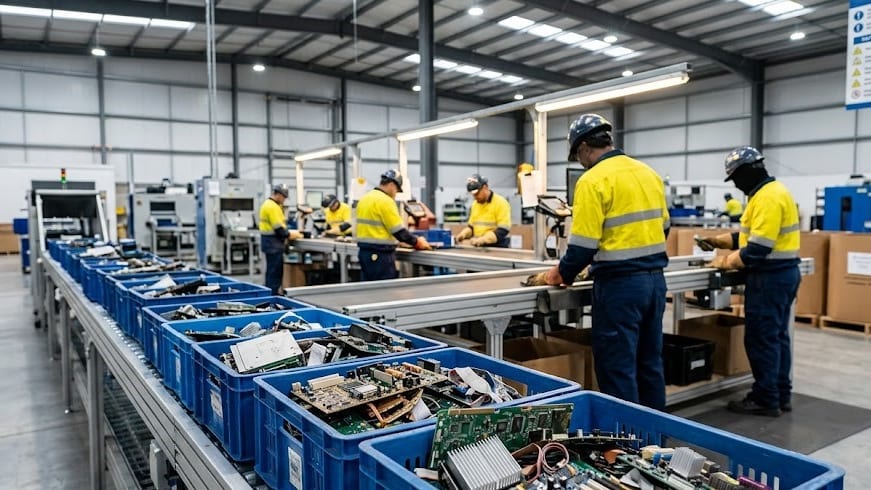
Businesses across San Francisco, Oakland, Berkeley, Richmond, San Jose, Palo Alto, Mountain View, Fremont, and the broader Bay Area regularly retire laptops, MacBooks, desktops, servers, networking equipment, phones, printers, copiers, and other electronics.
The question is not simply where to take old equipment. The more important question is who will control the equipment, protect the data, identify its value, and document the final outcome.
Choosing an electronics recycling provider without verifying its certifications, data-destruction capabilities, facility controls, and downstream practices can create unnecessary security, compliance, financial, and environmental risk. It can also cost a business money by sending reusable equipment directly into a scrap pathway.
The Hidden Risk in Bay Area Electronics Recycling
A retired laptop may contain customer records, employee information, financial documents, passwords, source code, emails, VPN credentials, or proprietary business information. The same applies to servers, storage arrays, phones, tablets, printers, copiers, scanners, and networking devices.
Data can remain on equipment even when:
- Files have been deleted
- A device has been factory-reset
- The operating system has been reinstalled
- A computer no longer starts
- A server has been removed from production
- A lease has ended
- A copier has been returned to a leasing company
- A device is labeled as broken or scrap
A provider that only weighs electronics or places equipment into a general recycling stream may not be providing the asset-level data security that a business expects.
Documented Enforcement Cases Involving Retired Equipment
The risk is not theoretical. Government enforcement actions have shown that improper disposal of information-bearing equipment can create significant penalties and exposure.
Morgan Stanley: $35 Million SEC Penalty
In 2022, the Securities and Exchange Commission announced that Morgan Stanley Smith Barney agreed to pay a $35 million penalty related to failures to safeguard the personal identifying information of approximately 15 million customers.
According to the SEC, the firm hired a moving and storage company without data-destruction expertise to decommission thousands of hard drives and servers. The moving company sold thousands of devices to a third party, and some devices still contained customer information when they were later resold through an internet auction site. The SEC also reported that Morgan Stanley failed to properly monitor the vendor’s work and that 42 servers potentially containing unencrypted customer information were missing.[1]
This case demonstrates why a company moving or storing equipment is not automatically qualified to perform IT asset disposition or data destruction. Vendor selection, oversight, inventory reconciliation, and documented processing all matter.
Affinity Health Plan: $1.2 Million Copier-Disposal Settlement
The U.S. Department of Health and Human Services reported that Affinity Health Plan agreed to a $1,215,780 settlement after photocopiers were returned to a leasing agent without erasing data stored on the copier hard drives. HHS said protected health information belonging to up to 344,579 individuals may have been disclosed.[2]
The investigation also found that copier hard drives were not included in the organization’s risk analysis and that policies and procedures for returning the equipment were not in place.
This is why Bay Area businesses should include copiers, scanners, multifunction printers, servers, and backup equipment in their electronics recycling and ITAD plans. They are not automatically low-risk just because they are not laptops.
Washington State Audit: Confidential Data Remained on Surplus Computers
A Washington State Auditor’s Office review estimated that 9% of state-owned computers sent to a surplus program during the review period contained confidential information. The audit identified Social Security numbers, dates of birth, medical records, tax forms, banking information, passwords, and network-access instructions on devices released for surplus.[3]
The audit found that documented procedures alone were not enough. Failures included human error, unsuccessful software erasure, incorrect labeling, and assumptions that broken equipment could not contain usable data.
The lesson for Bay Area organizations is simple: data sanitization needs verification and documentation. A policy sitting in an IT manual is not the same as a controlled process that produces evidence for each asset.
Why Certification Matters
Businesses should ask exactly what a recycler means when it uses the word “certified.” A business license, membership, local permit, or general quality claim does not establish that the provider has been independently audited for electronics recycling, data security, downstream accountability, or asset management.
The U.S. Environmental Protection Agency encourages businesses and governments to use electronics recyclers certified by an accredited, independent third-party auditor. EPA explains that certification provides a way to assess environmental, worker health and safety, security, and downstream-management practices.[4]
R2v3 is an important certification standard for electronics recyclers. A current R2v3 certificate should be verified through the official SERI directory, and the buyer should confirm that the certificate covers the actual facility and services being purchased.
The same principle applies to ISO claims. Ask for the certificate, certification body, facility or legal entity covered, certification scope, and current status. ISO certification claims should be independently verified through the applicable certification body or recognized certificate-verification resources, including IAF CertSearch where available.
Certification does not eliminate the need for project-specific questions. It gives procurement, security, compliance, and sustainability teams a meaningful framework for evaluating a provider’s operating controls.
Does a Certified Electronics Recycler Cost More?
Not necessarily. In many cases, a certified ITAD provider can make a corporate electronics disposition cost-neutral or net positive when the equipment has recoverable value.
A certified provider may generate revenue by:
- Testing and remarketing working laptops and desktops
- Buying eligible corporate computers directly
- Structuring a revenue-share arrangement
- Recovering value from servers and networking equipment
- Selling usable components and parts
- Separating reusable equipment from true end-of-life material
- Managing high-volume projects efficiently
The business may not need to pay a traditional disposal fee when the value of eligible equipment offsets logistics, registration, testing, sanitization, reporting, and recycling services. In some projects, the client may receive a recovery payment after the approved processing and sales terms are applied.
The outcome depends on the equipment’s age, model, configuration, condition, quantity, market demand, battery health, and lock status. It is not accurate to promise that every project will generate money. However, it is also a mistake to assume that certified service automatically means higher cost.
Some companies prefer a simple no-out-of-pocket ITAD project and do not want to manage residual-value sales. Others want to maximize recovery through a direct buyback or revenue-share program. A capable provider should be able to explain both options.
What to Ask a Bay Area Electronics Recycling Provider
Before releasing corporate equipment, ask the provider:
1. What Certifications Do You Hold?
Request the certificate number, certified address, scope, expiration status, and certification body. Verify the information rather than relying only on a website logo.
2. What Happens to Data-Bearing Equipment?
Ask how the provider handles hard drives, SSDs, NVMe drives, USB devices, SD cards, phones, servers, printers, copiers, scanners, and other equipment containing storage media.
3. What Destruction Equipment Do You Actually Operate?
A provider should be able to explain its equipment and media-specific methods. Degaussing may be suitable for magnetic hard drives and tape, but it does not sanitize SSDs, NVMe drives, USB flash drives, or SD cards. Flash-based storage requires an appropriate logical sanitization method or specialized physical destruction.
A basic shop press may deform a device without reliably destroying every flash-storage component. Ask whether the provider has suitable equipment for the media and whether the process is verified.
4. Do You Issue Serialized Certificates?
A weight ticket may show how much material was received, but it does not prove what happened to a specific hard drive, SSD, or laptop. Ask whether the provider issues serialized Certificates of Erasure and Certificates of Destruction and whether the records reconcile to the client’s asset tags.
5. How Is Chain of Custody Maintained?
Ask whether the provider documents the pickup, transferring representatives, piece counts, pallets, boxes, facility receipt, exceptions, and final disposition. If the final count will occur at the facility, that should be clearly stated in the custody record.
6. What Happens to Locked or Unidentified Equipment?
Apple Activation Lock, MDM, Autopilot, BIOS passwords, Computrace, carrier locks, missing tags, and damaged devices can affect both security and resale value. A good provider should place these items into an exception process rather than silently guessing at the outcome.
7. Can the Provider Show Real-Time Project Status?
For larger corporate projects, ask whether the client can see asset status after pickup. Visibility into receipt, testing, sanitization, destruction, exceptions, and value recovery reduces the black-box risk associated with off-site processing.
What Businesses Should Do Before Pickup
Bay Area businesses can reduce risk and improve recovery by preparing before the truck arrives:
- Create an inventory with asset tags, serial numbers, models, quantities, and storage details.
- Include printers, copiers, scanners, servers, backup appliances, removable media, and networking equipment.
- Confirm that backups, legal holds, investigations, and retention requirements are complete.
- Separate reuse candidates from destroy-only assets.
- Resolve Apple Activation Lock, MDM, Autopilot, BIOS, carrier, and other management restrictions when resale or redeployment is intended.
- Identify the required sanitization or destruction outcome.
- Define whether assets will be counted and serialized on site or at the provider’s facility.
- Request the required certificates, reports, photographs, video, and downstream documentation in writing.
- Agree on how failed, locked, damaged, unidentified, and out-of-scope assets will be handled.
NIST SP 800-88 Rev. 2 describes media sanitization as a process that makes access to target data infeasible for a given level of effort. It provides a risk-based framework for selecting appropriate sanitization and disposal techniques based on the information, media, and intended outcome.[5]
How Integritrade Serves the Bay Area
Integritrade provides corporate electronics recycling, IT asset disposition, data destruction, computer buyback, revenue-share remarketing, and value-recovery services throughout the San Francisco Bay Area and California.
Integritrade’s Pinole dispatch location supports coordinated Bay Area pickups and responsive scheduling for businesses in San Francisco, Oakland, Berkeley, Richmond, San Jose, Palo Alto, Mountain View, Fremont, and surrounding communities. Material is processed through Integritrade’s dedicated 30,000 sq ft ITAD Megacenter at 944 S Topeka Ave in Fresno, California.
The controlled-access facility includes 24/7 video monitoring, secure staging, industrial racking, dock capabilities, trained and background-checked personnel, PXE-based software-sanitization infrastructure, magnetic-media destruction equipment, and specialized physical-destruction capability for approved flash media.
Integritrade maintains R2v3, ISO 9001, ISO 14001, ISO 45001, and ISO/IEC 27001 certifications within their applicable scopes. R2v3 certification covers applicable responsible recycling, data-security, testing and repair, reuse, and downstream-management processes.
For Full ITAD projects, authorized clients receive access to TraceTech at no additional cost. TraceTech provides real-time asset and project status, client asset-tag reconciliation, Certificates of Erasure and Destruction as issued, a message center for service requests and project amendments, client-specific handling instructions, and value-recovery reporting.
A certified provider is not automatically more expensive. The right provider may help a company avoid disposal charges, recover value from eligible equipment, and create a secure, documented disposition at $0 out of pocket or better, depending on the inventory and agreed project terms.
Request a Bay Area ITAD and electronics recycling consultation or learn more about Integritrade’s ITAD services.
Frequently Asked Questions
Not necessarily. Integritrade may offset logistics, data sanitization, testing, reporting, and recycling costs through equipment buyback, remarketing, parts recovery, or revenue sharing. The final result depends on the inventory and project scope.
Potentially. Integritrade can evaluate whether eligible equipment has enough residual value to structure a project with no out-of-pocket cost. The inventory, minimum quantities, exclusions, and final settlement terms should be confirmed before work begins.
Yes. Integritrade supports Bay Area corporate pickups through its Pinole dispatch location and processes material through its secured Fresno ITAD Megacenter. Integritrade’s services include electronics recycling, data destruction, corporate computer buyback, Full ITAD, and value recovery.
No. Degaussing is designed for magnetic media. Integritrade treats SSDs, NVMe drives, USB flash drives, and SD cards as flash-based media requiring an appropriate logical sanitization method or specialized physical destruction.
A weight ticket documents the weight of material received. An Integritrade serialized Certificate of Destruction documents the physical destruction of identified data-bearing media or assets. They serve different purposes.
Yes. For Full ITAD projects, Integritrade provides authorized clients access to TraceTech at no additional cost. Clients can review asset status, reconcile internal tags, access certificates as issued, submit service requests, and review value-recovery information.